Skip to content
Biology Notes Online
  • All Notes
  • Botany
  • Microbiology
  • Zoology
  • Video
  • Resource
    • Microscopic Pictures

Home Home Videos How to Access Gene Sequences from NCBI (Step-by-Step)

How to Access Gene Sequences from NCBI (Step-by-Step)
18 views • June 1, 2026
Sourav Pan

Sourav Pan

Subscribe

Transcript

Published on June 1, 2026

NCBI stands for the National Center for Biotechnology Information.

NCBI is a public resource that provides free access to biomedical and genomic data worldwide. It’s maintained by the National Institutes of Health and serves researchers globally.

NCBI hosts several key databases. GenBank contains nucleotide sequences, Gene provides gene-specific information, and Nucleotide offers a search interface for sequences.

NCBI databases are interconnected. BioProject organizes research efforts, BioSample describes specimens, while SRA and GenBank store different types of sequence data.

NCBI provides powerful analysis tools. BLAST allows researchers to compare sequences and find similarities. Other tools include genome browsers and specialized analysis software.

NCBI provides user-friendly web interfaces for accessing all these resources, making genomic data accessible to researchers worldwide.

Now that we understand what NCBI is, let’s explore why accessing gene sequences is important for research.

The first step in accessing gene sequences is navigating to the official NCBI website.

NCBI, the National Center for Biotechnology Information, provides the world’s most comprehensive collection of biological databases.

To begin, open your web browser and navigate to the NCBI website at www dot ncbi dot nlm dot nih dot gov.

Once you enter this URL, you’ll arrive at the NCBI homepage.

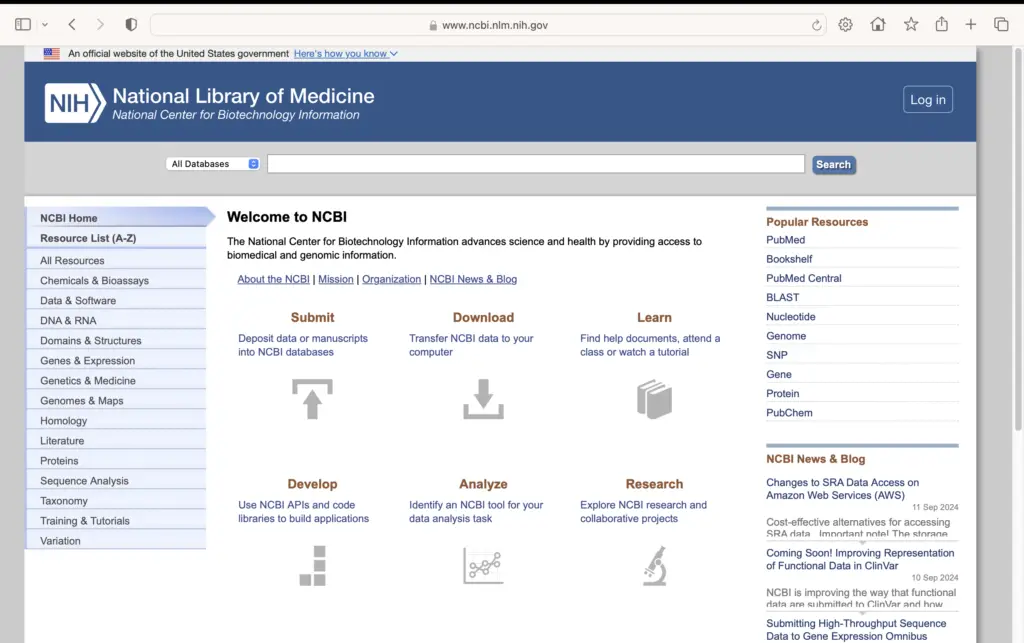
This is the NCBI homepage, which serves as your gateway to all NCBI resources and databases.

On the left side, you’ll find the navigation menu listing all NCBI resources alphabetically.

The central area contains the main search functionality, where you’ll begin your gene sequence search.

Remember these key points: always use the official NCBI website, and this homepage will be your starting point for all gene sequence searches.

Now that you’ve successfully navigated to the NCBI website, you’re ready for the next step in accessing gene sequences.

Now that we’re on the NCBI homepage, the next step is to locate and use the search bar.

The search bar is prominently located at the top of the NCBI homepage.

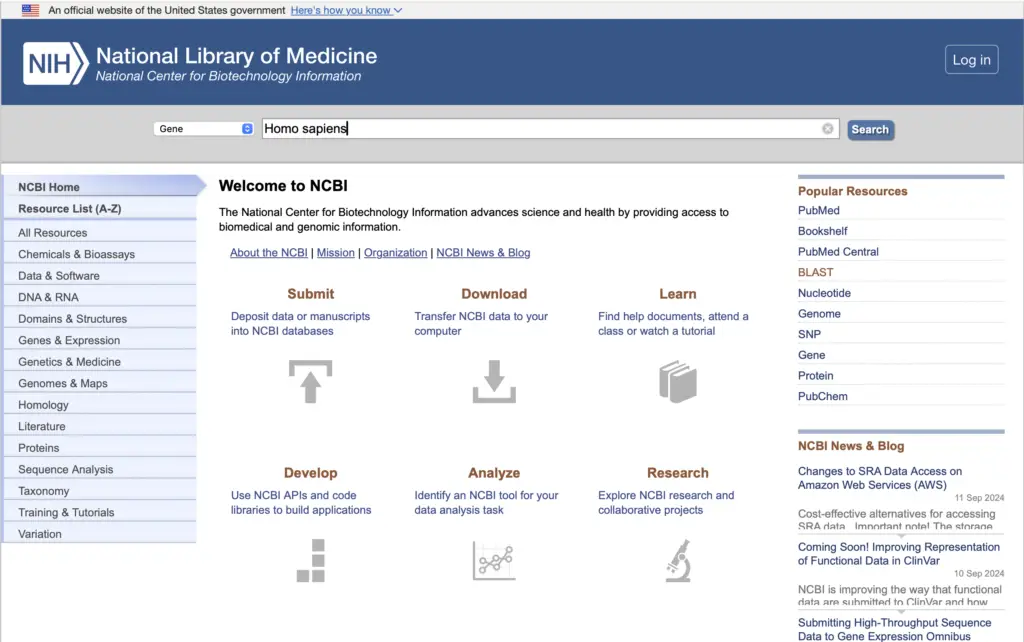
You can search for any gene by entering its name or symbol in the search bar.

Here are some common gene examples you might search for, such as BRCA1, TP53, CFTR, or APOE.

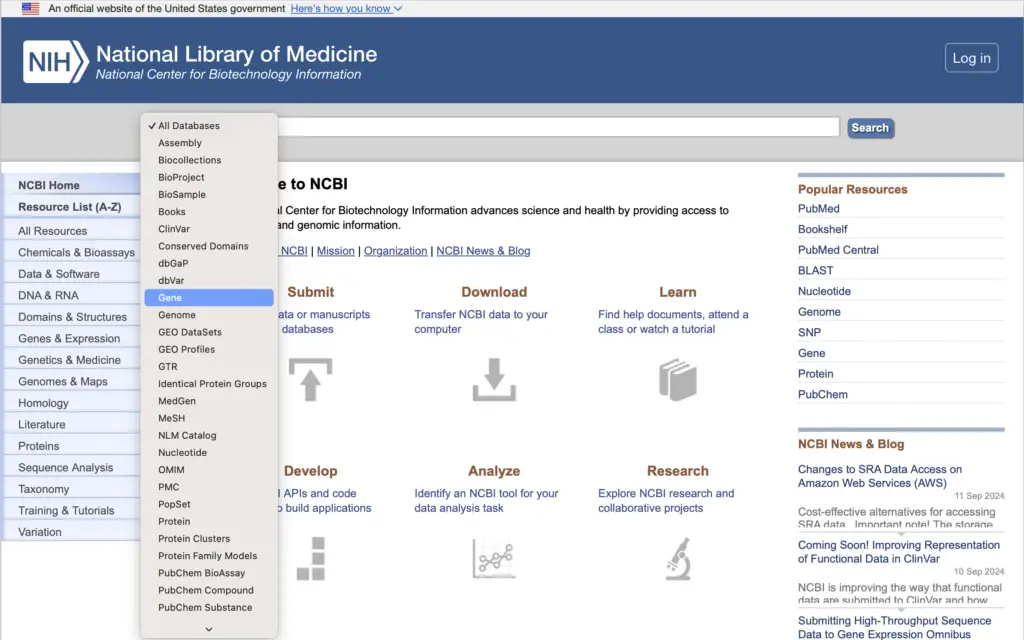
Before searching, you need to select the appropriate database from the dropdown menu.

For gene searches, select ‘Gene’ database. For direct sequence access, choose ‘Nucleotide’.

Here are some best practices for effective searching on NCBI.

Use official gene symbols rather than common names. Try alternative names if your initial search doesn’t work. Include species names for specificity, and use quotation marks for exact phrase matches.

The NCBI search bar is integrated with the site’s navigation system, providing easy access to all resources.

Now that you understand how to use the search bar, you’re ready to perform your first gene search.

Now that we have our search results, we need to carefully select the correct gene.

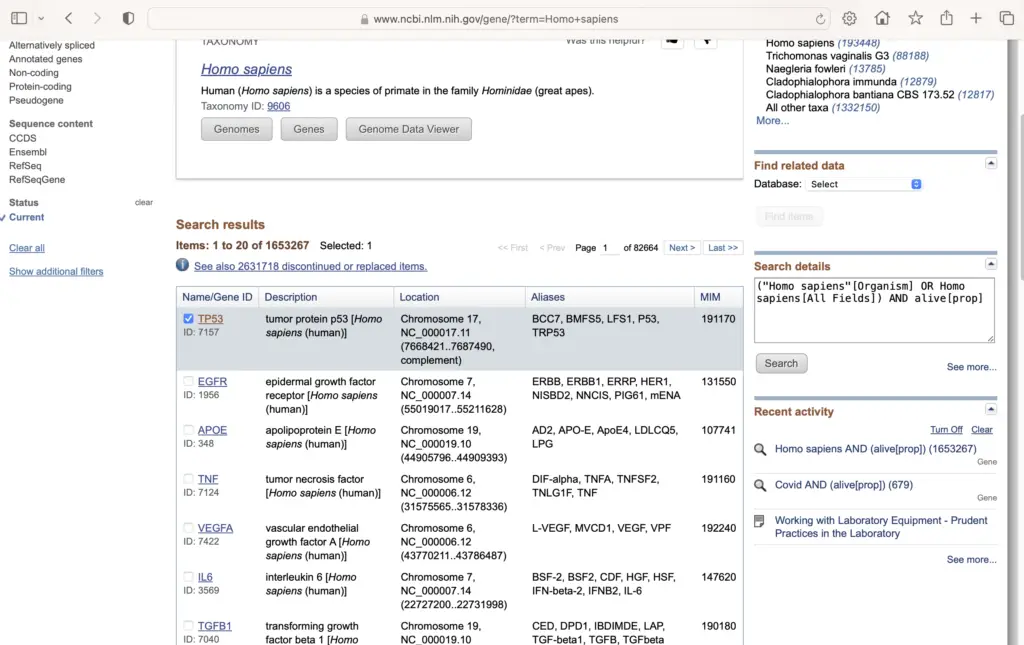
The search results will display multiple entries for the same gene from different organisms.

Each result shows the gene name, organism, and description. Let’s examine these entries one by one.

When selecting the correct gene, you need to consider several key criteria.

First and most importantly, ensure you select the correct organism. For human studies, choose ‘Homo sapiens’.

Here’s what a real gene selection interface looks like in NCBI’s Genome Data Viewer.

The interface provides detailed information about each organism and allows you to browse specific genomes.

Remember these best practices when selecting your gene: verify the organism, check the gene symbol, review the description, and consider the assembly version.

Once you’ve selected the correct gene, you’re ready to find the reference sequences.

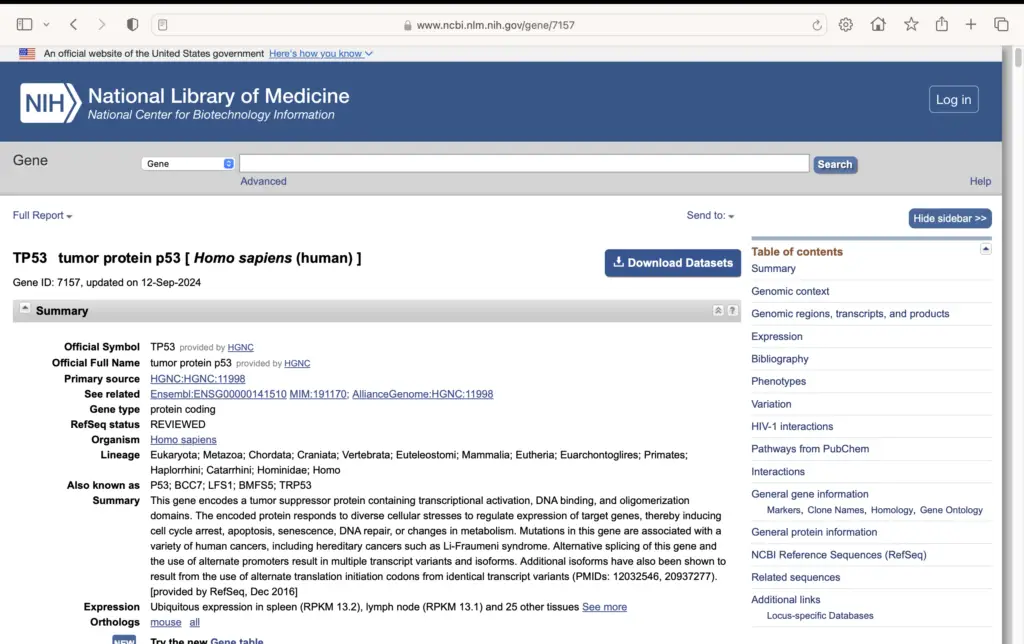
Now that you’ve selected your gene of interest, the next step is to find the Reference Sequences section on the gene record page.

Here we can see the MC1R gene record page. Notice the Table of Contents on the right side, where the Reference Sequences section is highlighted.

The Reference Sequences section contains various types of sequence records for the gene, including messenger RNA, protein, and genomic DNA sequences.

RefSeq sequences are particularly important because they are curated and validated by NCBI, ensuring high quality and accuracy for research purposes.

In the next step, we’ll learn how to choose the specific sequence you need from this Reference Sequences section.

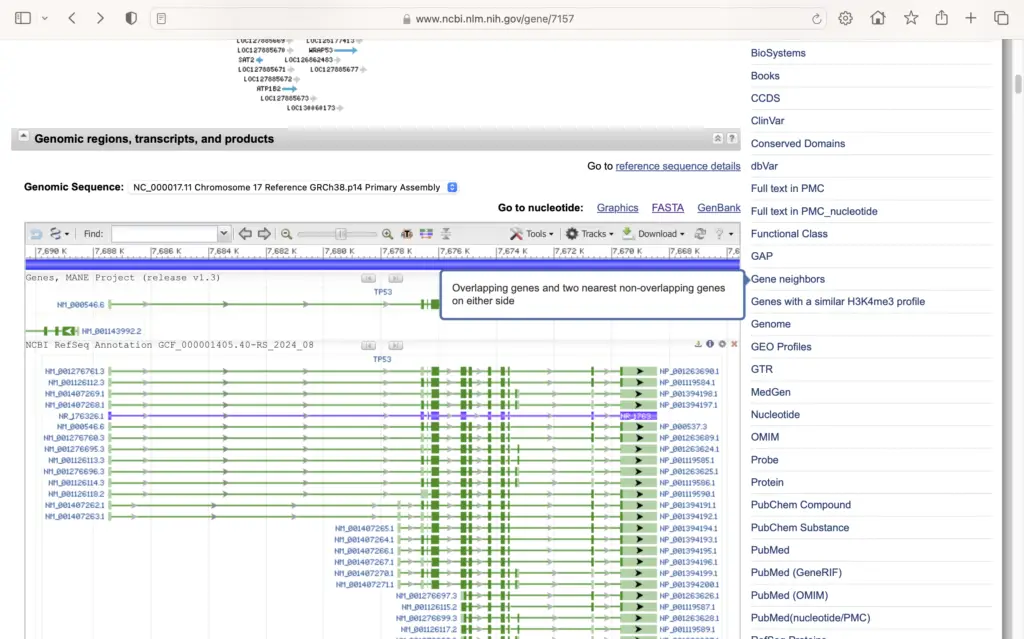
Now we’re at step 6, choosing the specific sequence we need from the Reference Sequences section.

In the Reference Sequences section, you’ll typically see multiple sequence options for your gene of interest.

Each option represents a different type of sequence, such as mRNA, genomic DNA, or protein sequences.

To choose your desired sequence, simply double-click on the name or ID of the sequence you need.

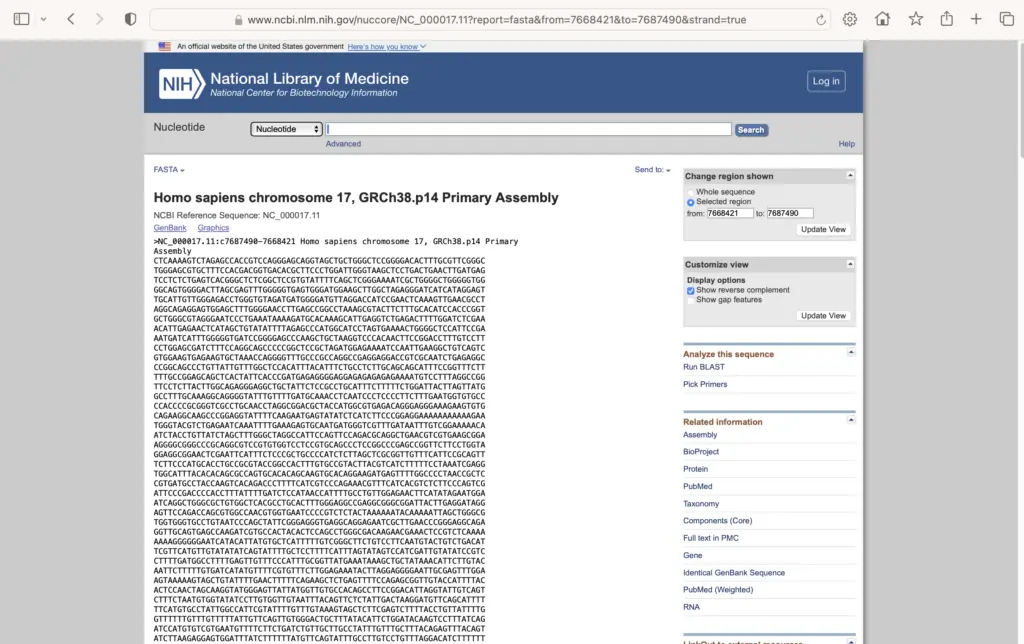
Let’s look at what sequence data looks like once you make your selection.

This shows an example of the detailed sequence information you’ll access, including both DNA and protein sequence data.

When you double-click your chosen sequence, the system automatically navigates you to the detailed sequence record in NCBI’s Nucleotide database.

This seamless transition gives you access to the complete sequence information and additional tools for analysis.

You’ve now successfully selected and accessed your desired gene sequence.

There’s another way to access GenBank sequences – directly through the NCBI Nucleotide database.

Instead of going through the Gene database first, you can search NCBI Nucleotide directly using two main approaches.

The first method uses specific accession numbers when you know exactly which sequence you want.

The second method allows you to search using biological information like gene names or organism details.

Let’s look at how accession number searches work in practice.

Accession numbers are unique identifiers assigned to each sequence in the database.

These come in different formats depending on the type of sequence and database source.

Now let’s see how metadata searches provide more flexibility.

Metadata searches allow you to find sequences using biological information rather than specific identifiers.

You can combine gene names, organisms, and sequence types to narrow your search results.

Here’s an example of the advanced analysis capabilities available through NCBI interfaces.

This shows a tissue-specific analysis interface that demonstrates the sophisticated tools available for sequence analysis.

Let’s compare the benefits of direct NCBI Nucleotide access.

Direct access to NCBI Nucleotide offers several advantages for targeted sequence retrieval.

This direct approach is particularly valuable when you need precise control over your sequence searches.

Next, we’ll explore another powerful tool for sequence retrieval.

NCBI Datasets represents a major modernization in how researchers access genomic data.

NCBI Datasets provides three key improvements: streamlined access to genomic data, an enhanced taxonomy browsing experience, and more efficient genome downloads.

The platform introduces enhanced workflows for generating gene lists, combining structure and OMIM database searches through streamlined ELink processes.

The Genome Data Viewer showcases the redesigned taxonomic tree, making it easier to browse organisms and access their genomic data.

Key features include an intuitive taxonomic tree for organism selection and integrated search and download capabilities.

NCBI Datasets also integrates advanced analysis capabilities, including interactive visualizations and built-in statistical tools for comprehensive genomic research.

These modernization efforts result in faster data access, simplified research workflows, and enhanced data visualization capabilities for the scientific community.

NCBI Datasets continues to evolve, providing researchers with cutting-edge tools for genomic data exploration.

The NCBI Submission Portal has received significant enhancements to better support researchers submitting sequence data.

The enhanced portal now provides a streamlined interface for submitting complex sequence data.

The portal now specifically supports eukaryotic nuclear messenger RNA sequences with advanced annotation capabilities.

Key new features include coding sequence annotation, protein feature marking, and streamlined feature table uploads.

Feature tables are central to the new submission enhancements, allowing detailed sequence annotation.

Feature tables provide a structured way to annotate sequence elements like coding sequences and transfer RNAs.

The table defines feature locations, types, and qualifiers, with automatic protein ID generation during processing.

The submission process follows a clear workflow from data deposit to publication.

The enhanced workflow ensures quality control while streamlining the path from submission to publication.

Each step includes validation, processing, and automatic feature annotation to ensure data quality and consistency.

The portal enhancements enable better visualization and analysis of submitted sequences.

These enhancements result in more accurate sequence annotations and better protein feature identification.

Researchers benefit from improved annotation accuracy, streamlined coding sequence identification, and enhanced protein mapping capabilities.

The NCBI Submission Portal enhancements represent a significant advancement in sequence data submission capabilities.

These improvements make it easier for researchers to submit high-quality sequence data with comprehensive annotations.

The enhanced portal continues to evolve to meet the growing needs of the research community.

Congratulations! You’ve completed this comprehensive journey through NCBI gene sequence access.

Let’s review what you’ve accomplished throughout this tutorial.

You can now navigate NCBI databases efficiently, search and retrieve gene sequences, understand different file formats, use advanced tools, and access the latest genomic data.

Now let’s see a real-world example of what’s possible with the skills you’ve learned.

Here’s a comprehensive analysis of the PIK3CA gene showing mutation patterns, domain structures, and variant frequencies – all data that can be accessed and analyzed using NCBI databases.

The possibilities for research and discovery are endless with the tools you now possess.

Continue your journey by diving deeper into specific databases, exploring comparative genomics, analyzing sequence variations, and contributing to scientific discovery.

The world of genomics is at your fingertips. Keep exploring, keep discovering, and unlock the secrets hidden within genetic sequences!

Thank you for joining us on this educational journey. Happy researching with NCBI!

Study Materials

How do you access gene sequences from NCBI? - Step by Step Process
Curious about how to get gene sequences from NCBI? Whether you’re a student, researcher, or just a genetics enthusiast, NCBI is an amazing resource for all things genetic. It can…
Read More

Start Asking Questions Cancel reply

0 found this helpful out of 0 votes
Helpful: 0%
Was this page helpful?

Related Videos

youtube thumb 0bowqz4Fv7I
Understanding the Henderson-Hasselbalch Equation
Sourav Pan
1,704 views • 1 year ago
youtube thumb KX1zsyAMXUY
The Binomial Naming System
Sourav Pan
1,692 views • 1 year ago
youtube thumb XU8lm9lgRVY
Glycogenesis Explained: The Glucose to Glycogen Conversion
Sourav Pan
1,398 views • 10 months ago
youtube thumb hMp0 lEy1FU
What is Agrobacterium-Mediated Gene Transfer in Plants?
Sourav Pan
13 views • 3 days ago
youtube thumb 1qp7hQWXe3k
Disinfectant Testing Methods Explained
Sourav Pan
8 views • 3 days ago
youtube thumb j ZtJN0umww
Nematodes: The Unsegmented Wonders of Nature
Sourav Pan
1,643 views • 1 year ago
youtube thumb 4b mMiC06DQ
What is Centrifugation? – explained in Detail
Sourav Pan
24 views • 3 days ago
youtube thumb QeiKcC9ynGE
Drosophila Eye Reciprocal Cross (Biology Animation)
Sourav Pan
1,820 views • 2 years ago
youtube thumb KxgQjY ZMvk
Southern Blotting Explained in 3 Minutes
Sourav Pan
1,732 views • 1 year ago
youtube thumb W6ANam7K2zw
Asexual Reproduction: Cloning Organisms Explained
Sourav Pan
1,876 views • 1 year ago
  • About Us
  • Contact Us
  • Affiliate Disclosure
  • Privacy Policy
  • Terms and Conditions
© 2024 Biology Notes Online